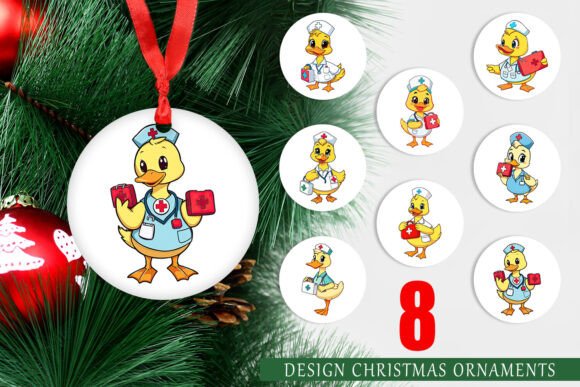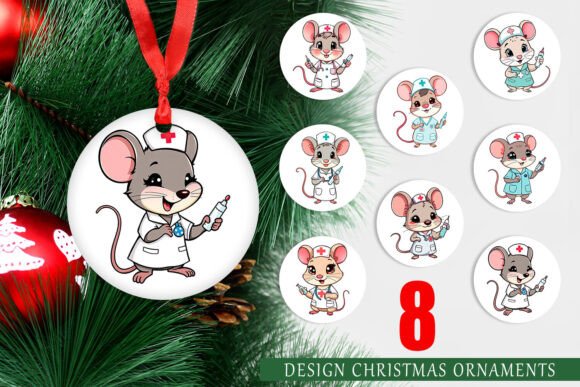
Ornament Nurse Mouse: Elevating Holiday Decor with Professional-Grade Printable Designs
The holiday season is a time for personalization, and for healthcare professionals, nothing says "home" quite like decor that reflects their passion and profession. The Ornament Nurse Mouse collection has emerged as a favorite among nurses, nursing students, and medical enthusiasts looking to add a touch of whimsy and pride to their Christmas trees. However, the difference between a charming, professional-looking ornament and a pixelated, disappointing craft project often lies in the details of the digital file itself. Understanding the technical specifications and proper application of these designs is crucial for achieving high-quality results.
This set of eight circular decorative designs offers more than just cute imagery; it provides a versatile toolkit for creators. Yet, many users overlook critical aspects of resolution, sizing, and material compatibility, leading to subpar outcomes. By addressing common pitfalls early, you can ensure your final products are crisp, vibrant, and durable.
Understanding the Value of High-Resolution Digital Assets
At first glance, a PNG file might seem like a simple image format. However, when dealing with physical printing, not all PNGs are created equal. The Ornament Nurse Mouse set is specifically engineered at 300 DPI (dots per inch) with dimensions of 1500x1500 pixels, resulting in a perfect 5x5-inch print size. This specification is not arbitrary; it is the industry standard for high-quality sublimation and direct-to-garment printing.
A common misunderstanding among beginners is assuming that any image found online can be resized indefinitely without loss of quality. This is false. When you stretch a low-resolution image to fit a 5-inch circle, the pixels become visible, resulting in a blurry, amateurish appearance. For entrepreneurs selling handmade goods or hobbyists creating gifts, this lack of clarity can significantly diminish the perceived value of the item. Using a file explicitly designed at 300 DPI ensures that every line of the nurse mouse’s scrubs, the stethoscope, and the festive elements remains sharp and defined.
Common Mistakes in File Preparation and Printing
Even with high-quality source files, errors in preparation can ruin the final product. Here are the most frequent issues users encounter and how to avoid them.
Ignoring the Transparent Background Requirement
One of the primary advantages of PNG files over JPEGs is the ability to support transparent backgrounds. A frequent mistake is printing the design on white paper and then cutting it out manually, leaving a harsh white border around the circular design. This looks unprofessional, especially if you are using colored ornaments or non-white substrates.
The Better Approach: Ensure your printing software recognizes the transparency. If you are using sublimation printers, print directly onto sublimation paper. If you are using inkjet printers for sticker decals, use clear sticker paper. This allows the Ornament Nurse Mouse design to blend seamlessly with the background color of your ornament, whether it is red, green, gold, or silver.
Misjudging Color Profiles and Printer Settings
Digital screens display colors in RGB (Red, Green, Blue), while printers use CMYK (Cyan, Magenta, Yellow, Key/Black). Without proper calibration, the vibrant reds of a nurse’s cap or the greens of a Christmas tree in your digital preview may appear dull or muddy when printed. Many users skip the step of checking their printer’s color management settings, leading to dissatisfaction with the final output.
Practical Advice: Always perform a test print on standard paper before committing to expensive sublimation blanks or specialty papers. Check for color accuracy and brightness. If colors appear washed out, adjust your printer settings to "High Quality" or "Photo" mode rather than "Draft" or "Standard." This uses more ink but ensures the rich tones intended by the designer are preserved.
Overlooking Material Compatibility
The Ornament Nurse Mouse designs are versatile, but they are not universal. A design printed for a ceramic sublimation ornament will not adhere correctly to a glass bauble without the appropriate adhesive or coating. Similarly, using regular home printer ink on fabric ornaments will result in smudging and fading over time.
Check Before You Print: Identify your substrate first. Are you making metal, ceramic, wood, or fabric ornaments?
- Sublimation: Requires polyester-coated blanks and heat presses. Ideal for metal and ceramic.
- Inkjet/Laser: Suitable for paper, cardstock, and adhesive labels. Best for wooden slices or flat surfaces.
- Vinyl Cutting: If you plan to use these as templates for vinyl, note that PNGs are raster images. You may need to trace them into vector formats using software like Illustrator or Cricut Design Space for clean cuts.
Maximizing the Versatility of the 8-Design Set
This collection includes eight unique circular designs. A missed opportunity for many users is treating each design as a single-use item. In reality, these assets can be mixed, matched, and repurposed for various projects beyond traditional tree ornaments.
Consider using the 5x5-inch circles as:
- Gift Tags: Print multiple designs on a single sheet of cardstock, cut them out, and punch a hole for twine. This adds a personalized, professional touch to holiday gifts for colleagues.
- Cupcake Toppers: Scale the images down to 2 inches for edible paper prints or cardstock toppers, perfect for hospital unit holiday parties.
- Coasters: Use the high-resolution files to create custom coasters for nurses' break rooms, providing a morale-boosting decor item.
By thinking beyond the tree, you maximize the value of your purchase. The high resolution ensures that even when scaled down for smaller items, the details remain crisp.
Evaluating Quality Before Purchase
When browsing for digital designs like the Ornament Nurse Mouse, it is essential to know what to look for to avoid poor-quality downloads. Many marketplaces sell files that are upscaled from low-resolution sources, which cannot be fixed by downloading.
Key Checks:
- File Format: Ensure the listing specifies PNG with transparency. JPEGs will have white backgrounds that are difficult to remove cleanly.
- Resolution Specs: Look for explicit mentions of 300 DPI. If only pixel dimensions are given, do the math. For a 5-inch print, you need at least 1500 pixels (5 inches x 300 DPI = 1500 pixels).
- Preview Images: Zoom in on the product previews. If the edges look jagged or pixelated in the preview, the actual file will likely suffer from the same issues.
Taking a moment to verify these details saves time, money, and frustration. It ensures that the effort you put into crafting is matched by the quality of the materials you use.
Final Thoughts on Crafting with Confidence
Creating holiday decor is a rewarding process that combines creativity with technical skill. The Ornament Nurse Mouse printable design set offers a fantastic foundation for beautiful, meaningful decorations. By respecting the technical requirements of high-resolution printing, choosing the right materials, and avoiding common preparation errors, you can produce ornaments that are not only visually appealing but also durable and professional.
Whether you are a small business owner looking to expand your holiday inventory or a nurse wanting to personalize your home, attention to detail is key. Embrace the precision that 300 DPI files offer, experiment with different substrates, and enjoy the satisfaction of creating something truly special. The holidays are about warmth and connection, and there is no better way to express that than through thoughtfully crafted, high-quality decor.